

PosiGen Customers Technical Support Guide

SAFETY FIRST
This guide is for basic resets and diagnostics only.
Your safety is paramount. Do not attempt any work you are not comfortable with. Never touch exposed wiring.
Help! My system is reporting zero production.
Before contacting support, please perform the following steps. This can often get your system back online immediately.
Step #1: Check the Weather
Is it nighttime, heavily overcast, or are the panels covered in snow? Your system needs direct sunlight to produce power.
Step #2: Check Your Breakers
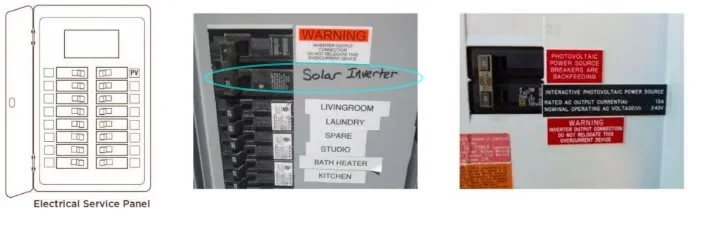
Go to your main electrical panel.
Find the breaker labeled "Solar" or "PV."
Flip it completely OFF, then back ON.
Step #3: Reset Your Inverter
Locate your solar inverter (the box that converts DC solar power to AC home power, usually in your garage or on an exterior wall).
Follow the specific shutdown and startup procedure. This is critical.
Step A: Turn off the AC Disconnect. This is usually a grey box near the inverter with a large handle. Pull the handle down.
Step B: Turn off the DC Disconnect. This is usually a dial or switch on the inverter itself. Turn it to the "OFF" position.
Step C: Wait 5 minutes. The inverter screen should go blank.
Step D: Turn everything back on. First, turn ON the DC disconnect on the inverter. Then, push the AC disconnect handle back up.
The inverter will take 5-15 minutes to restart and sync with the grid. Wait and see if production resumes on its screen.
Specific Technical Help
My PosiGen App Isn't Working
IMPORTANT:
The PosiGen monitoring portal and your login are no longer active.
Please await your welcome email from Omnidian for further instructions and next steps related to your solar system account. In the meantime, you can check for production directly on your inverter's screen.
I need help with my Enphase system.
Please see our Enphase System Help Guides below:
Enphase IQ Gateway Connection Guide
Enphase Envoy-S-Metered Connection Guide
Enphase Envoy-S-Standard Connection Guide
Enphase Envoy-R Connection Guide